Your first outbound campaign (in under an hour)
By Jai Toor · April 2026
I haven't figured this out. I want to say that up front because most guides about outbound sales are written by people pretending they have, and you can tell. They're too clean. Too certain.
I've spent the past year helping founders set up outbound with Deepline. I've watched dozens of them launch their first campaigns, and I keep seeing the same mistakes and the same breakthroughs. This is what I've learned so far.
The best cold email I ever sent was also the simplest. The worst was when I was trying hardest to sound smart. That pattern kept showing up, and I think it explains most of what goes wrong with founder-led sales.
1. You have a pain problem, not a writing problem
Most founders, when they decide to "do outbound," start by googling cold email templates. They sign up for a few tools. They write something that reads like a press release. They send it to 5,000 people. Nothing happens.
They assume the copy was bad. Usually it wasn't. Or rather, the copy was bad, but that wasn't why it failed.
It failed because they were describing a problem that either wasn't painful enough, wasn't painful right now, or was described in words the buyer wouldn't recognize.
Someone on r/SaaS put it well: "Founder-led sales isn't a sales problem. It's a research problem."
That's been my experience too. The founders who struggle with outbound aren't struggling with writing. They're struggling to articulate what pain they solve, for whom, and why this week instead of next month. Once you can answer those three things in plain language, the email writes itself. Getting to that clarity is the hard part.
If you're not getting replies, go back to the pain. Not your pain, their pain, described the way they'd describe it to a coworker. If you can't do that yet, you don't have a writing problem. You have an understanding problem.
2. The bar test
I made one change to my outbound that improved everything: I stopped using jargon.
My old emails were full of it. "Synergistic solutions." "AI-powered insights to optimize your go-to-market velocity." I look back at those LinkedIn messages and cringe. They read like a chatbot wrote a press release about a press release.
The new emails said the same thing in normal words. Short sentences. One problem. One ask.
I started calling this the bar test. If you wouldn't say it to someone you met at a bar, it shouldn't be in your outbound. "We leverage AI-driven pipeline acceleration to synergize your revenue operations" would make a person back away from you at a party. "I noticed you're hiring three SDRs, we help teams find warm leads without the headcount, worth a look?" is something you'd say to someone.
An analysis of 100K+ LinkedIn DMs confirmed this. Conversational openers got 54.7% more replies than formal ones. The cold email template getting the most traction on X right now is under 50 words. It booked 50 meetings.
The numbers back this up. Instantly's 2026 benchmark report across 100M+ emails puts the platform-wide average reply rate at 3.43%. But campaigns targeting fewer than 50 recipients average 5.8%, while blasting 1,000+ drops to 2.1%. Smaller, more relevant batches win by a factor of three.
I used to over-personalize. "I saw you went to Michigan State and you like hiking and your dog is named Charlie" isn't personal. Everyone knows you scraped their LinkedIn. The only personalization that matters is proving you understand their problem. People don't want to feel researched. They want to feel understood.
3. Message-market fit
This is the framework that made outbound click for me.
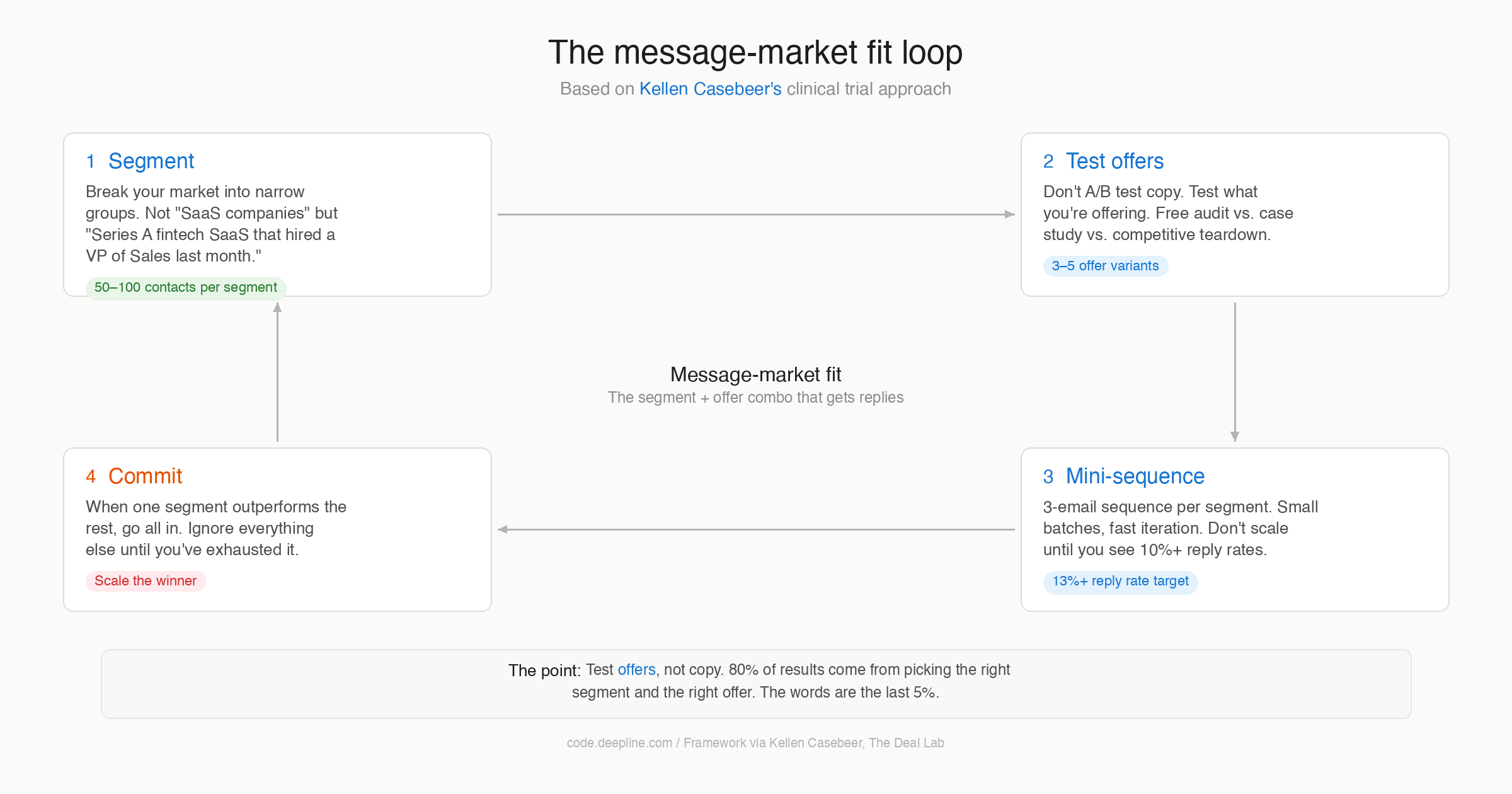
Kellen Casebeer, who runs The Deal Lab, distinguishes between product-market fit and message-market fit. Product-market fit means your product solves a real problem. Message-market fit means your description of that problem lands so well that people respond. You can have the first without the second. Your product works, but the way you talk about it doesn't connect. Most founders are stuck here.
Kellen treats outbound campaigns like clinical trials. You segment your market into narrow groups, not "SaaS companies" but "Series A fintech SaaS that hired a VP of Sales last month." Then you test offers, not copy. Free audit vs. case study vs. competitive teardown. The offer matters more than the phrasing. You run small batches, 50 to 100 contacts per segment, 3-email sequences. You don't scale anything until one segment pulls a 10%+ reply rate. When something outperforms, you go all in on that segment and ignore everything else.
His clients regularly get 13%+ reply rates this way. They don't write better emails than anyone else. They find the right segment-offer combination first.
I was treating outbound like a copywriting exercise before I found this. Now I treat each campaign like an experiment. The question shifted from "how do I write a better email" to "which 50 people are most likely to care about this specific problem right now."
Further reading:
- Kellen Casebeer on finding message-market fit (LevelUp Leads Podcast, Ep. 06)
- The clinical trial approach to message-market fit (Cannonball GTM)
- Message-market-fit: how to test 13 campaigns systematically (GTM Engineer School)
- What founders get wrong about GTM (Predictable Revenue)
- Mastering cold email, Kellen Casebeer x Noah Adelstein (FishmanAF Newsletter)
4. PULL, or why most sales calls go nowhere
Rob Snyder is a 3x founder and Harvard Innovation Lab fellow. He gave me language for something I'd been feeling but couldn't put into words.
His framework is called PULL. A buyer has pull when four things are true at the same time:
P is for project. They have something specific on their to-do list that's being prioritized now. U is unavoidable. There's a deadline, a mandate, a competitive threat making it urgent. L is looking. They're evaluating options, asking peers, reading reviews. The second L is limitations. The existing options have flaws bad enough that the buyer can't make the progress they need.
When all four are present, you barely have to sell. You show up, don't confuse them, and they buy. When any one is missing, you're pushing. Persuading. "Overcoming objections." That's not selling, it's begging.
Rob's tactical version of this is the sales sprint. You write a PULL hypothesis (who has all four elements right now?), you schedule five sales calls (even before you have a product), you run the calls to see if PULL exists, and then you adjust the hypothesis. Five to ten calls a week. The goal isn't to pitch. The goal is to learn whether the person across from you has an unavoidable project with no good alternatives. If they do, you don't need a pitch. If they don't, no pitch will save you.
Everybody told me "when founder-led sales clicks, it feels different." I nodded and moved on. Then it happened and I understood what they meant. You're not persuading anyone. You're describing their situation back to them and they say "yes, exactly, how do I start?" No copywriting trick will manufacture that. You have to find the person who has PULL.
A related trap: as a founder you can get almost anyone to take a meeting. Your energy, your story, your "we're two people in a garage" thing. It works. People take the call. But getting a meeting because you're charming is different from getting a meeting because someone has the problem. I ran 10 meetings a week for a while and felt productive. Nothing converted. The meetings were happening for the wrong reason.
Further reading:
- The PULL framework, in detail (Rob Snyder)
- The physics of sales
- How to figure out 0-1 sales
- PULL is everywhere
- Push, Pull, and PULL
- Podcast: The Physics of Startups (Spotify)
- Founder-led sales (Rob Snyder)
5. The Mom Test, and where it runs out
The Mom Test by Rob Fitzpatrick is one of the best books for early founders. The idea: stop asking people if your idea is good (they'll lie to be nice) and start asking about their life, their problems, their behavior. Good rules.
But there's a limit to it.
The Mom Test gets you good conversations. You'll hear "yeah, that's a pain point" and "I'd use something like that." You'll feel validated. Maybe you'll get a few design partners. But "I'd use that" and "take my money" are very different sentences. "That's a pain point" and "I'm looking for a solution right now" are different too.
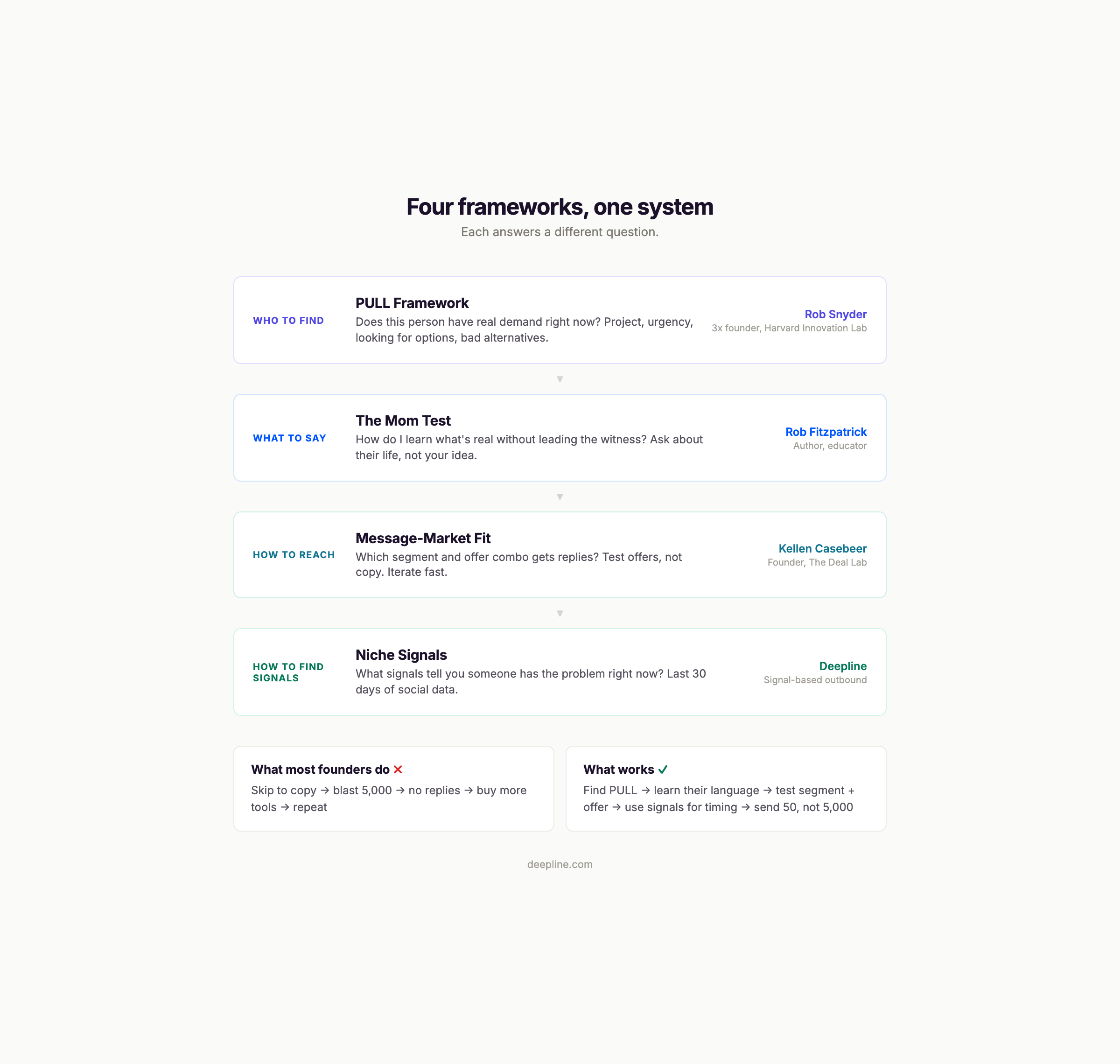
The Mom Test teaches you how to listen. It doesn't teach you how to find the right people to listen to. That's where Rob Snyder's PULL framework picks up. The Mom Test tells you what to say in the conversation. PULL tells you who to have the conversation with. Kellen Casebeer's message-market fit tells you how to reach them at scale. You need all three. Most founders read The Mom Test and stop there.
If you've done 30 interviews and still can't describe your ideal customer in one sentence, you're talking to the wrong people.
Further reading:
- The Mom Test book
- Stop wasting time on bad feedback, the Mom Test approach (r/saasbuild)
- How to convert customers with cold emails (YC)
6. What it feels like when it works
I was catching up with Ben Holley at April Tools Day and he said something that stuck: if you get someone at the right time with the right context, your message can say basically anything.
He's right. Everybody said something like this to me and I thought they were being precious. They weren't.
When it works, you're describing someone's specific Wednesday to them. They respond because you understand what they're dealing with, not because your email was clever.
I went from sending 500 emails and getting 3 replies (two "not interested," one ghost) to sending 50 emails to a narrow segment and getting 8 replies. Five wanted a call. Three went somewhere real. Ten times fewer emails, ten times the results. And the emails were shorter and took 5 minutes to write instead of two hours.
I didn't believe people when they told me "it feels different." Then I felt it. When you nail the pain and the timing and the person, you could send a three-sentence email with a typo and people will reply. You can't shortcut your way there. You have to do the work of understanding the pain well enough to describe it better than your buyer can.
7. Tools (keep it short)
Founders waste more time on tool selection than on any other part of outbound. I've watched people spend three weeks comparing email tools before sending a single message.
You need two things: something to find people and something to send messages.
For sending, three options all work fine. Lemlist does email, LinkedIn, and calls in one platform with 450M contacts and built-in warm-up. HeyReach is best for LinkedIn-heavy outbound. Instantly is cheapest for high-volume email with unlimited inboxes.
I use Lemlist. I've tried running multiple tools at the same time and I don't understand the point. I want one tool that does everything. Most of our customers use HeyReach and Smartlead, so people disagree with me. Pick one and start sending.
For finding people: that's the hard part, and that's where Deepline fits.
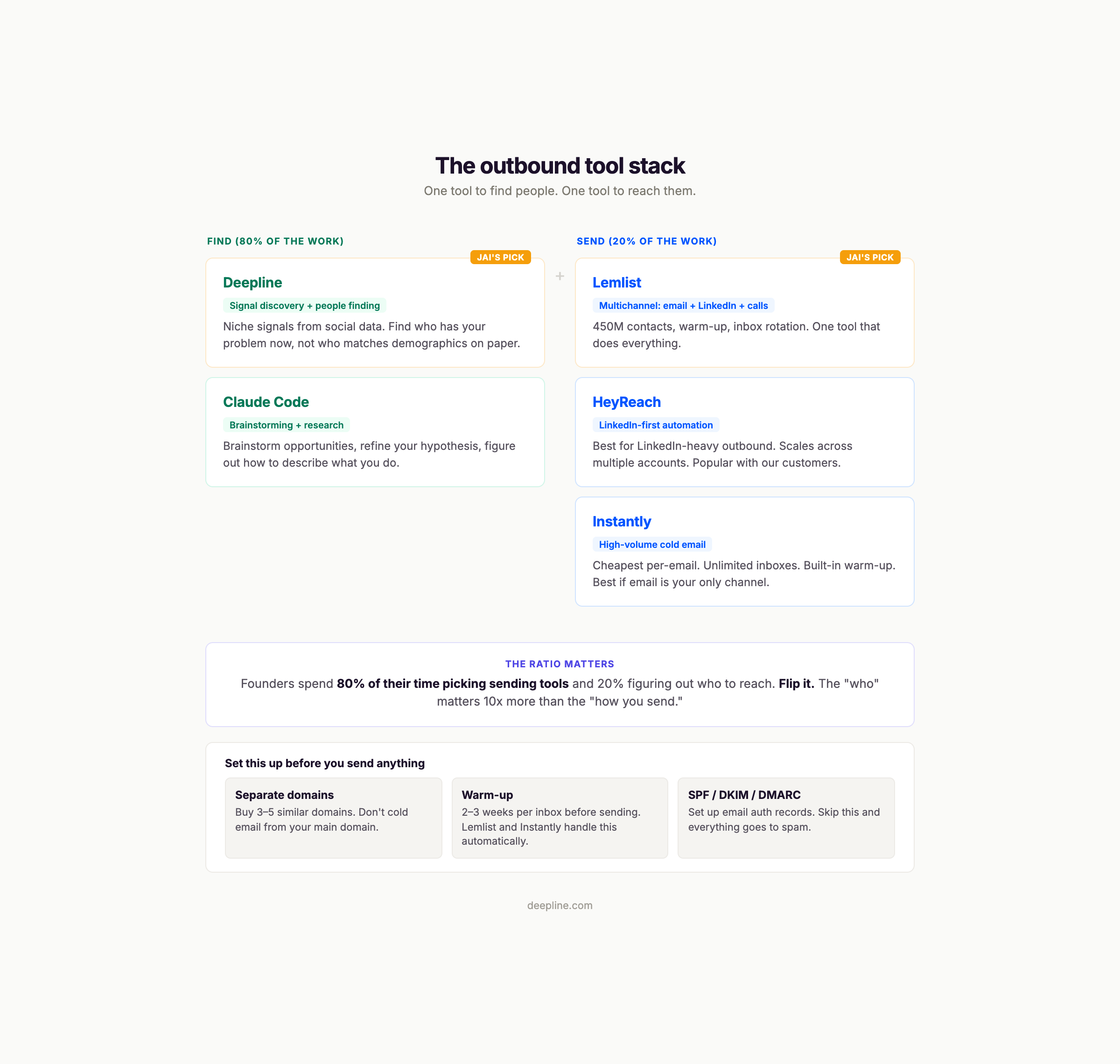
I've watched founders agonize over Lemlist vs. Instantly vs. HeyReach for weeks while never talking to a single prospect. The tool doesn't matter. Whether the person receiving your email has the problem you solve, right now, and you can describe it in their words: that matters. The tool is a delivery mechanism.
8. Email infrastructure (the boring part that decides everything)
Most cold email campaigns die before anyone reads a word. Not because the copy was bad, not because the targeting was off, but because the emails landed in spam. Nobody talks about the unsexy part of cold email: infrastructure takes weeks. But skip it and nothing else matters.
This section is the complete setup guide. Do it yourself or hand it to your agent. Follow the steps in order.
Step 1: Buy separate domains
Never send cold email from your main company domain. If your primary domain gets flagged, your regular business email goes down with it.
Buy 3-5 domains that look related to your main brand. If your company is acme.com, buy domains like getacme.com, acmeapp.com, tryacme.com, hiacme.com. Use variations, not your exact domain.
Where to buy them:
- Porkbun — easy, cheap ($11/year for .com), free WHOIS privacy, Cloudflare-powered DNS built in.
- Cloudflare Registrar — sells domains at cost ($10.46/year, zero markup). Ideal if you're already using Cloudflare for DNS.
- Namecheap — simplest for beginners. 24/7 support, straightforward interface.
Or skip all of this and use a fully managed service like Scaledmail that handles domain purchasing, DNS setup, mailbox creation, and warm-up in one place.
Spread your domains across 2-3 different registrars. This reduces risk if one registrar flags your account.
Tip: Let new domains age for at least 2 weeks before sending any email from them. Domains less than 30 days old get scrutinized harder by spam filters. Per r/coldemail, "90%+ of cold emails landing in spam" is often traced to domains that were too new when campaigns launched.
Step 2: Set up mailboxes (3 per domain)
You need an email provider for each domain. Three inboxes per domain is the safe maximum, per Zapmail and the consensus on r/coldemail.
Your provider options:
Google Workspace ($7.20/user/month) is the most reliable. Gmail inboxes have the highest baseline deliverability. Set up one admin workspace, attach one domain, create three inboxes (e.g., jai@getacme.com, hello@getacme.com, team@getacme.com). This is the primary lane for most teams.
Microsoft 365 / Outlook ($6/user/month) is the secondary lane. Outlook has different spam filter logic than Gmail, so running both providers gives you better coverage. Outlook's daily sending limit is 10,000 recipients with a cap of 30 emails per minute. Per Smartlead's comparison, mixing providers is the safest approach.
Zapmail ($4/inbox/month + $15/year per domain) is a newer option that handles domain purchase, mailbox creation, and DNS setup in one place. They isolate each domain into its own workspace so one bad domain can't affect another. Good if you want less manual work.
Pre-warmed inboxes (skip the wait): If you don't want to spend 2-4 weeks warming up from scratch, you can buy inboxes that are already warmed:
- Mailforge starts at $3/inbox. Budget-friendly, ready-to-send with built-in warm-up history.
- Infraforge / Primeforge offers pre-warmed Google and Outlook accounts.
- Hypertide automates the full setup across Google Workspace and Microsoft 365, delivering ready-to-use inboxes in 4-6 hours.
- Mailreef lets you buy pre-warmed servers, domains, and unlimited mailboxes on dedicated infrastructure.
Pre-warmed accounts let you skip the 3-4 week warm-up entirely. Most start around $3-4/inbox/month.
Add a profile picture and signature to every inbox. Inboxes without photos get flagged as automated.
Step 3: Set up DNS authentication (SPF, DKIM, DMARC)
This is the part that makes most founders' eyes glaze over. But in 2026 it's non-negotiable. Gmail, Yahoo, and Microsoft now enforce authentication for bulk senders. Per InboxKit's DNS guide, domains with all three records properly configured achieve 89% inbox placement. Domains with only SPF average 61%.
Think of it this way: SPF is your guest list (who's allowed to send from your domain). DKIM is a wax seal (proves the message wasn't tampered with). DMARC is the bouncer (decides what happens when someone fails the checks).
SPF (5 minutes per domain)
- Go to your domain's DNS settings (in your registrar or Cloudflare)
- Add a TXT record:
v=spf1 include:_spf.google.com ~all(for Google Workspace) orv=spf1 include:spf.protection.outlook.com ~all(for Microsoft 365) - If you're using a sending tool like Lemlist or Instantly, add their SPF include too (check their docs for the exact string)
DKIM (10 minutes per domain)
- In Google Workspace Admin, go to Apps > Google Workspace > Gmail > Authenticate email
- Generate a DKIM key, then add the provided TXT record to your DNS
- For Microsoft 365, DKIM is in the Microsoft Defender portal under Email authentication
DMARC (5 minutes per domain, then a gradual rollout)
- Add a TXT record:
v=DMARC1; p=none; rua=mailto:dmarc@yourdomain.com - Start with
p=none(monitoring only) for 2 weeks so you can see reports without affecting delivery - After 2 weeks, move to
p=quarantine; pct=25(quarantine 25% of failures) - After another 2 weeks, move to
p=quarantine; pct=100
Per r/emaildeliverability, "SPF pass + DKIM pass + DMARC fail is almost always an alignment issue, not missing records." Alignment means your From domain matches the domain in your SPF and DKIM records. If you set up everything under the same domain, alignment happens automatically.
Guides for each provider:
- DNS records setup for cold email, step-by-step (InboxKit)
- SPF, DKIM, DMARC basics for cold email (Mailforge)
- SPF DKIM DMARC setup for cold email (Prospeo)
- How to set up SPF, DKIM, and DMARC (Mailstand)
- Email authentication setup guide (SmartReach)
Step 4: Turn off open tracking
I don't track opens anymore, just replies. Open tracking embeds invisible pixels. Click tracking rewrites your links. Both are signals that spam filters use to identify bulk outreach. The data isn't worth the deliverability hit.
Step 5: Warm up your inboxes (2-4 weeks)
If you bought pre-warmed inboxes from Mailforge, Hypertide, or similar, skip to step 6. If you're starting with fresh inboxes, warm them up first.
Warming means gradually increasing email volume while simulating real conversations, so your inbox builds a reputation with Gmail and Outlook before you start sending cold.
The warm-up schedule (per Smartlead's guide):
Week 1: 5-10 emails per day. All warm-up emails (automated back-and-forth with other warm-up inboxes). No cold sends.
Week 2: 15-25 emails per day. Still all warm-up. Your inbox is building reputation.
Week 3: Start adding 5-10 cold emails per day alongside warm-up. Monitor bounce rates and spam placement.
Week 4: Ramp to 15-25 cold emails per day per inbox. Keep warm-up running in the background (always keep it on, even after launch).
Sending limits after warm-up:
- 15-25 campaign emails per inbox per day
- Weekdays only, send during business hours in the recipient's timezone
- With 3 inboxes across 4 domains (12 inboxes total), you can send 180-300 emails per day
Tools that handle warm-up automatically:
- Instantly has built-in warm-up across their network
- Smartlead has a daily ramp-up feature that increases volume automatically
- Lemlist includes Lemwarm (free on higher plans)
Keep your warm-up to campaign send ratio at roughly 2:1. If you're sending 20 cold emails per inbox per day, keep 40 warm-up emails running.
Step 6: Verify your list before sending
Before loading contacts into your sending tool, run every email address through a verification service. Bounces destroy your sender reputation faster than anything else.
Aim for a bounce rate under 3%. If your list has a higher bounce rate, clean it and remove the unverifiable addresses.
Common verification tools: NeverBounce, ZeroBounce, MillionVerifier. Most charge $3-5 per thousand verified emails. Per r/emaildeliverability, this is the cheapest insurance you can buy for your domains.
The full infrastructure checklist
Before you send your first cold email, confirm:
- [ ] 3-5 separate domains purchased (not your main domain)
- [ ] Domains aged at least 2 weeks
- [ ] 3 inboxes per domain set up (Google Workspace, Outlook, or both)
- [ ] Profile picture and signature on every inbox
- [ ] SPF record added for each domain
- [ ] DKIM enabled and DNS record added for each domain
- [ ] DMARC set to p=none for monitoring
- [ ] Open/click tracking turned off
- [ ] Warm-up running for 2-4 weeks (or pre-warmed inboxes purchased)
- [ ] Email list verified, bounce rate under 3%
This takes an afternoon to set up for 4 domains. After that, it runs in the background. Skip any of these steps and you'll spend weeks wondering why nobody replies, when the real answer is that nobody saw your email.
Everyone skips infrastructure, then blames their copy. A post on r/coldemail about sending 40,000 emails made it painfully clear: infrastructure kills campaigns before copy does. Do this once, do it right, then forget about it.
Infrastructure resources:
- Cold email infrastructure tools compared (Mailforge)
- Cold email infrastructure tools (Primeforge)
- Pre-warmed email accounts buyer's guide (Prospeo)
- Best cold email infrastructure providers, honest comparison (Puzzle Inbox)
- Cold email server setup checklist (Prospeo)
- Mailreef cold email infrastructure
- Hypertide automated inbox setup
9. How Deepline works
The hard part of outbound isn't writing the email or picking the tool. It's answering a question most founders can't: "What signals tell me someone has my problem right now?"
Traditional outbound means finding companies that match demographic criteria (industry, size, funding stage) and blasting them all. Signal-based outbound means finding people who are exhibiting behavior that suggests they have the problem today.
A company posts three SDR job listings. They're scaling outbound. They might need better lead gen tools. A VP of Marketing writes a LinkedIn post about struggling with attribution. They have a measurement problem. A competitor raises a round and your prospect's board starts pressuring them. Urgency exists. These are niche signals, and finding them manually takes hours.
This is what we built Deepline for. You start with what you know: your wins, your losses, who bought, who didn't, why. If you don't have wins yet, start with who you think your customer is. Keep it rough. Feed that hypothesis in and look at what your market has been saying over the last 30 days. What phrases do they use when describing the pain. What events are creating urgency.
Then you find people who match those signals. LinkedIn profiles, emails, context. You write a short email that references the specific signal. You send it. You see what happens.
The research part used to take weeks. Now it takes maybe 15 minutes. The emails you write after that are easy because you actually understand who you're writing to.
The thing that's hard about outbound is knowing what to look for. Once you have the signals, the emails write themselves.
10. Building your first campaign: a walkthrough
If you're starting from zero, here's what an hour looks like.
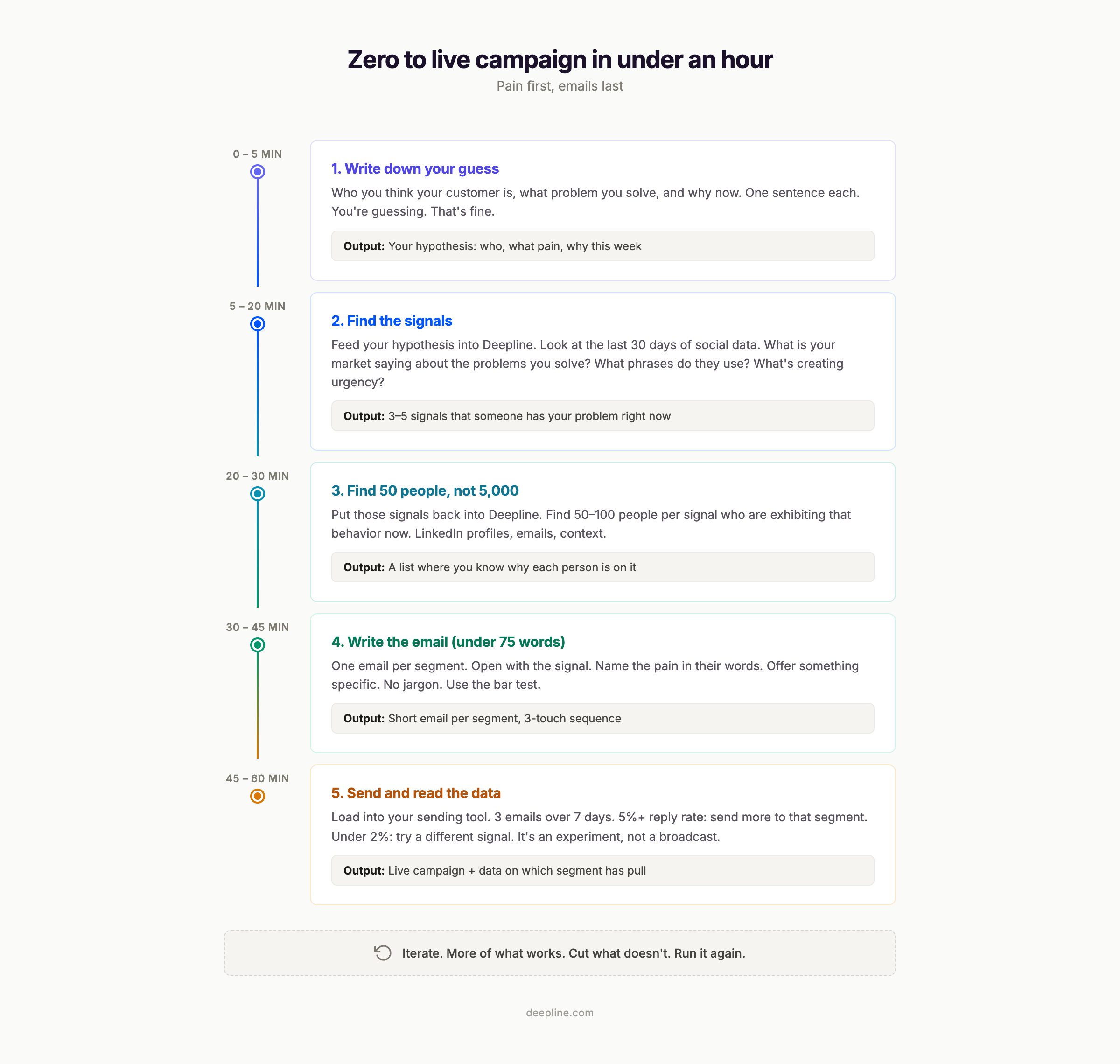
Minutes 0-5. Write down three things. Who you think your customer is — and be painfully specific. Not "Series A SaaS companies." More like "Series A vertical SaaS founders who just hired their first SDR, are burning through Apollo credits, and realized their enrichment data is 40% stale." So specific that you shouldn't be able to name another company targeting the exact same niche. What problem you solve for them, in one plain sentence. And why now — what's happening in the market that makes this urgent.
Minutes 5-20. Open Deepline. Feed in your hypothesis. Run niche signals for the last 30 days. Look at what people in your market are talking about on social media. Note the specific phrases they use when describing the pain. Note what events or changes are creating urgency. Write down the top 3-5 signals.
Minutes 20-30. Use Deepline to find 50 people per signal. Not 5,000. Fifty. For each person, you should know why they're on this list, what their pain probably is, and what language they use to describe it.
Minutes 30-45. Write one email per segment. The message should be WIIFM — what's in it for you — from the first line. Not what you do. What they get. Open with the signal: what they posted, hired for, or announced. Name the pain in their words, not your product language. Offer something specific: a teardown, an audit, a relevant case study. Not "let's chat." Keep it under 75 words.
A template that works:
Subject: [the signal]
Hey [name],
[What's in it for them — the outcome they'd get, tied to the signal you noticed.]
[One sentence about the pain that usually comes with that signal, in their language.]
[One specific offer — teardown, audit, case study.]
Worth a look?
No "I hope this finds you well." No three-paragraph company backstory.
Minutes 45-60. Load the list into Lemlist. Set up three emails: the one above, a one-line follow-up on day 3 with a data point, and a breakup on day 7: "Figured this isn't relevant right now. If it is, I'm here." Hit send.
After day 7. Read the data. 5%+ reply rate means you're onto something, send more to that segment. 2-5% means the segment might be right but the offer needs tweaking. Under 2% means you should try a different signal.
This takes less time than most founders spend choosing an email tool.
11. Things I believe about outbound
A thread on r/coldemail titled "Everyone told me cold email was dead in 2026" pulled 194 comments. The consensus: cold email isn't dead, AI slop cold email is dead. It works. But only if you do it right.
Over-personalization is dead. "I saw you went to Ohio State and you like paddleboarding" isn't personalization. Everyone knows you scraped their LinkedIn. The only personalization that matters is proving you understand their problem.
You need more clarity, not more tools. Three sending tools, two enrichment tools, a data provider, and a CRM, and you still can't articulate who your customer is. The thinking is the bottleneck, not the stack.
AI cold emails still sound like garbage. r/coldemail is clear on this: "Stop using AI to write your emails." But AI is good at research, segmentation, and finding signals. Use AI to figure out who to email and why. Write the email yourself.
LinkedIn is somehow still underrated. The YC playbook for 2026 is increasingly LinkedIn first. Post daily. Comment on 10 prospect posts for 30 days. Then reach out. By the time you send the DM, they recognize your name. Slower, but the conversion rate is much higher. Garrett Wolfe wrote a good breakdown of this. His blog getaob.com is worth following.
Short emails win. Under 75 words. The framework that booked 50 meetings was five lines. The one that booked zero was three paragraphs. Guess which one the founder spent more time on.
Data beats copy. The r/coldemail consensus is something like 60/40 data to copy. Get the targeting right first. Infrastructure second. Copy third.
If it feels like sales, you're talking to the wrong person. When outbound is working, it feels like helping. You're describing someone's problem and offering to solve it. If you feel like you're persuading, step back.
Speed beats perfection. Your first campaign will be mediocre. Send 50 emails, learn from the data, iterate. The founder who sends 3 campaigns of 50 will learn more in a week than the founder who spends a month on the "perfect" first email.
Nobody wakes up excited to read your cold email. Respect that. Be brief. Be relevant. Get in, make your point, get out.
The framework stack
Four frameworks, one system. Each answers a different question.
| Question | Framework | Who | |----------|-----------|-----| | Does this person have real demand? | PULL | Rob Snyder | | How do I learn what's real in conversation? | The Mom Test | Rob Fitzpatrick | | Which segment + offer combo works? | Message-market fit | Kellen Casebeer | | What signals indicate the problem exists now? | Niche signals | Deepline |
Further reading
Rob Snyder, The Physics of Startups
- The PULL framework, in detail
- How to figure out 0-1 sales
- The physics of sales
- Customer language 101
- Podcast (Spotify)
Kellen Casebeer, Message-market fit
- The Deal Lab
- Clinical trial approach to message-market fit (Cannonball GTM)
- LevelUp Leads podcast, Ep. 06
- Finding message-market fit (Salespreneur Stories, Spotify)
The Mom Test
YC and First Round on founder sales
- How to convert customers with cold emails (YC)
- 0-$5M: how to nail founder-led sales (First Round Review)
- Conversation framework for founder-led sales (Predictable Revenue)
Cold email
- Instantly cold email framework (400+ replies/month)
- 4 phases to email-message fit (Aerosend)
- Cold email copywriting (Clay blog)
I said at the start I haven't figured this out. That's still true.
But the gap is not tools, or copywriting, or AI. The gap is understanding the pain well enough to describe it better than the person experiencing it. Once you can do that, the emails write themselves, the calls book themselves, and it stops feeling like sales. It feels like helping someone with a problem. Which is what it should be.
Start with the pain. Do less. Listen more.
Jai Toor builds Deepline. He writes his own cold emails. They're usually under 50 words.
Run your entire GTM motion from Claude Code
Install Deepline and get 45+ GTM data providers in your terminal. Enrich, validate, and sequence — all through natural language.