The 5-tool problem
Building an outbound campaign manually looks like this:
- Apollo or LinkedIn Sales Nav to build the list
- Hunter or Prospeo to find emails
- ZeroBounce or NeverBounce to verify
- ChatGPT or Claude to write personalized lines
- Instantly or Lemlist to send
Each tool has its own login, billing model, and export format. A 200-contact campaign takes 2-3 hours of tab-switching.
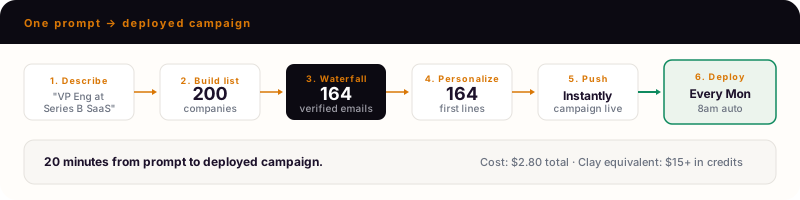
How to build a campaign in one prompt
Step 1: Describe your ICP
Claude Code reads the Deepline campaign builder skill and runs:
deepline enrich --input icp-search.csv --output campaign.csv \
  --with 'contacts=apollo_org_search:{"person_titles":["VP Engineering"],"num_employees_ranges":["100-500"]}' \
  --with-waterfall email \
  --with 'verify=leadmagic_email_validation:{"email":"{{email}}"}' \
  --with 'personalize=deeplineagent:{"prompt":"Write a 15-word personalized opener for {{first_name}} at {{company}}"}' \
  --rows 0:4
Step 2: Review the pilot
Deepline runs 5 contacts first. You see:
- Each contact with verified email
- The personalized first line
- Credits used
Step 3: Scale to full list
Claude Code continues with the full run and sequences:
deepline enrich --input icp-search.csv --output campaign.csv \
  --with 'contacts=apollo_org_search:...' \
  --with-waterfall email \
  --with 'verify=leadmagic_email_validation:...' \
  --with 'personalize=deeplineagent:...'

deepline enrich --input campaign.csv --with instantly_add_to_campaign --payload '{"campaign_id":"eng-leaders-q2"}'
Results land in your sequencer ready to send.
What happens under the hood
| Stage | What Deepline does |
|---|---|
| List building | Apollo search filtered to your ICP criteria |
| Email enrichment | Waterfall across 10+ providers, cheapest first |
| Verification | LeadMagic or IPQualityScore validation |
| Personalization | Claude writes a one-sentence opener per contact |
| Sequencer push | Instantly, Smartlead, or Lemlist API import |
Cost breakdown
| Campaign size | Credits | Managed mode cost |
|---|---|---|
| 50 contacts | 30-40 | ~$3-4 |
| 200 contacts | 120-150 | ~$12-15 |
| 500 contacts | 300-400 | ~$30-40 |
Personalization adds ~0.1 credits per contact. Sequencer push is free.
Who uses this
- GTM engineers building repeatable outbound systems
- Founders running founder-led sales
- Agencies spinning up campaigns across multiple clients
Deploy as a weekly workflow
Once the one-off works:
Claude Code deploys:
deepline workflows deploy eng-leaders-campaign --trigger cron --schedule "0 8 * * MON"
Fresh leads, fresh personalization, every week. Run history in the dashboard.
Common questions
Frequently Asked Questions
1Can I customize the personalization prompt?+
Yes. Add instructions: 'Reference their company's recent funding round if available. Keep it under 15 words.'
2What sequencers are supported?+
Instantly, Smartlead, Lemlist, HeyReach. More coming.
3What if my ICP is more specific?+
Add filters: 'Must be hiring engineers. Must use Snowflake or dbt.'
Try this yourself
Install the CLI and run this use case in under 5 minutes.