Why CRM data rots
B2B contact data decays 25-30% per year. People change jobs. Emails bounce. Companies merge or shut down. Your CRM fills up with stale records that break routing rules and waste SDR time.
The most cost-effective way to keep your CRM clean: run background agents that check job changes daily, validate emails, and flag stale records automatically.
How to clean your CRM
Step 1: Export your contacts
Pull a segment from HubSpot, Salesforce, or Attio as a CSV. Include email, name, company, and any fields you want to validate.
Step 2: Run a pilot cleanup
Claude Code reads your Deepline skills and runs:
deepline enrich --input crm-export.csv --with-waterfall email --with 'validate=leadmagic_email_validation' --rows 0:49
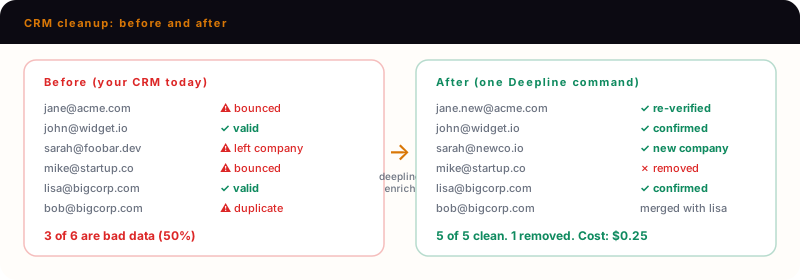
Step 3: Review what Deepline flags
For each contact, the output shows:
- Email status: valid, catch-all, or bounced
- Job change: new title and company if detected
- Duplicate cluster: other records that match this person
Step 4: Run the full list
Claude Code continues:
deepline enrich --input crm-export.csv --with-waterfall email --with 'validate=leadmagic_email_validation'
Step 5: Write back to CRM
Claude Code runs the upsert:
deepline enrich --input output.csv --with hubspot_batch_upsert_objects --payload '{"object_type":"contacts","id_property":"email"}'
Only changed fields update. Good data stays untouched.
What gets flagged
| Issue | How Deepline detects it |
|---|---|
| Bounced email | LeadMagic or IPQualityScore validation |
| Job change | Title/company mismatch vs. current LinkedIn profile |
| Duplicate record | Same email or LinkedIn URL across rows |
| Stale firmographics | Company size, funding, or industry changed |
Cost breakdown
| Database size | Credits | Managed mode cost |
|---|---|---|
| 500 contacts | 250 | ~$25 |
| 5,000 contacts | 2,500 | ~$250 |
| 50,000 contacts | 25,000 | ~$2,500 |
Compare to ZoomInfo Enrich at $15K/yr or manual spot-checks at 40+ hours per quarter.
Who uses this
- RevOps leads responsible for data quality
- Ops teams running quarterly hygiene before board reporting
- Sales managers tired of reps calling people who left 6 months ago
Deploy background agents for ongoing cleanup
Instead of quarterly manual cleanups, deploy background agents that run daily:
Claude Code deploys:
deepline workflows deploy crm-cleanup --trigger cron --schedule "0 8 * * *" --notify slack
Background agents research accounts across multiple providers, detect job changes, validate emails, and surface changes for your approval - all without manual exports.
Common questions
Frequently Asked Questions
1Does this overwrite good data?+
No. Deepline only updates fields where it found newer information. If a field is blank in the enrichment, the original value stays.
2What CRMs are supported?+
HubSpot, Salesforce, and Attio have native integrations. For others, export/import via CSV.
3How do I handle duplicates?+
Deepline clusters them for review. You decide which record to keep.
Try this yourself
Install the CLI and run this use case in under 5 minutes.