The tab-switching problem
Before every call, SDRs tab between LinkedIn, Crunchbase, the company website, G2, and their CRM. Most of that time is mechanical: copying data from one place to another.
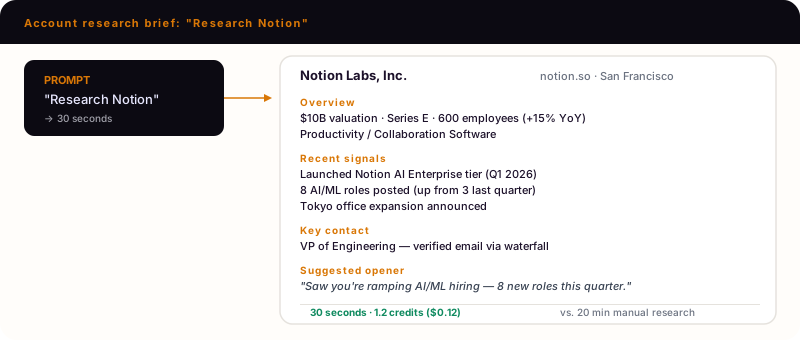
How to research an account in 30 seconds
Option 1: Single account
Tell Claude Code
Research Acme Corp (acme.com). Pull firmographics, recent funding, tech stack, hiring velocity, and the VP of Engineering's verified email. Structure as a one-page brief.
Claude Code reads the Deepline account research skill and runs enrichment across multiple providers:
deepline enrich --input acme.csv --output brief.csv \
  --with 'company=crustdata_companydb_autocomplete:{"field":"company_name","query":"Acme Corp"}' \
  --with 'tech=builtwith_domain_lookup:{"domain":"acme.com"}' \
  --with 'jobs=crustdata_job_listings:{"company_name":"Acme Corp"}' \
  --with 'news=exa_search:{"query":"Acme Corp recent news"}' \
  --with 'contacts=apollo_org_search:{"organization_name":"Acme Corp","person_titles":["VP Engineering"]}'
Option 2: Batch research
Tell Claude Code
Research all accounts in accounts.csv. Same format as before.
Claude Code runs the same enrichment across all rows:
deepline enrich --input accounts.csv --output briefs.csv \
  --with 'company=crustdata_companydb_autocomplete:{"field":"company_name","query":"{{Company}}"}' \
  --with 'tech=builtwith_domain_lookup:{"domain":"{{Domain}}"}'
What the brief includes
| Section | Data sources |
|---|---|
| Company overview | Apollo, People Data Labs |
| Funding history | Crunchbase via Crustdata |
| Tech stack | BuiltWith, TheirStack |
| Hiring velocity | Crustdata job postings |
| Recent news | Exa semantic search |
| Key contacts | Apollo, with verified emails via waterfall |
Sample output
# Acme Corp (acme.com)

**Overview:** B2B SaaS, 150 employees, Series B ($25M, 2024)
**Industry:** Data infrastructure
**HQ:** San Francisco, CA

**Tech stack:** Snowflake, dbt, Fivetran, Looker
**Hiring:** 12 open roles (6 engineering, 3 sales)

**Recent news:**
- Announced SOC 2 Type II certification (March 2026)
- Featured in a16z infrastructure report (Feb 2026)

**Key contact:**
- Jane Smith, VP Engineering
- jane.smith@acme.com (verified)
- linkedin.com/in/janesmith

**Why they might buy:**
Data infrastructure team scaling fast. Likely feeling pain around...
Cost breakdown
| Volume | Credits | Managed mode cost |
|---|---|---|
| 1 account | 1-2 | ~$0.10-0.20 |
| 10 accounts | 10-20 | ~$1-2 |
| 100 accounts | 100-200 | ~$10-20 |
Who uses this
- AEs prepping for discovery and demo calls
- BDRs qualifying accounts before outreach
- Founders doing founder-led sales
Push briefs to CRM
Tell Claude Code
Write this research brief to the HubSpot company record for acme.com.
The brief lands as account notes. Available to the whole team.
Common questions
Frequently Asked Questions
1Can I customize what goes in the brief?+
Yes. Add or remove sections: 'Skip tech stack. Add competitor analysis.'
2What if the company is small or private?+
Deepline pulls what it can from multiple providers (Apollo, People Data Labs, Crustdata). Missing data is noted, not hallucinated.
3Can I run this on my pipeline daily?+
Yes. Deploy as a workflow that researches new accounts added to a HubSpot list.
Try this yourself
Install the CLI and run this use case in under 5 minutes.